Halloween Skulls / RCP

New from Halloween Skulls · Windows software

Routine Creator Pro

Create the performance—not just the movements. Automatically choreograph a cast of talking and singing animatronics, or bring a skull to life with precisely synchronized live speech and record your performance for playback.

Built from more than 20 years of hands-on animatronics experience to save experienced programmers time and help newcomers create impressive shows without mastering traditional frame-by-frame programming.

Unrestricted 14-day trial · Direct VSA file compatibility · Personal support from Halloween Skulls

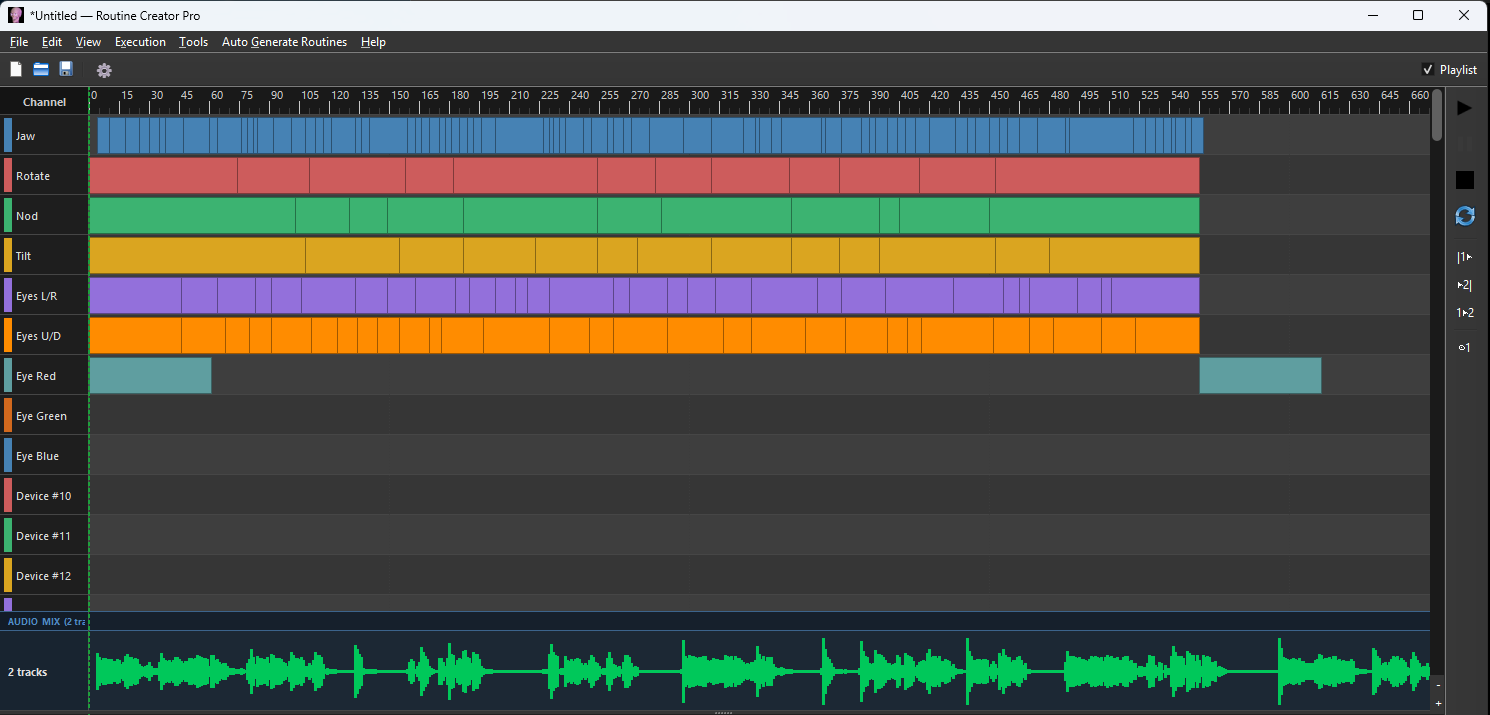
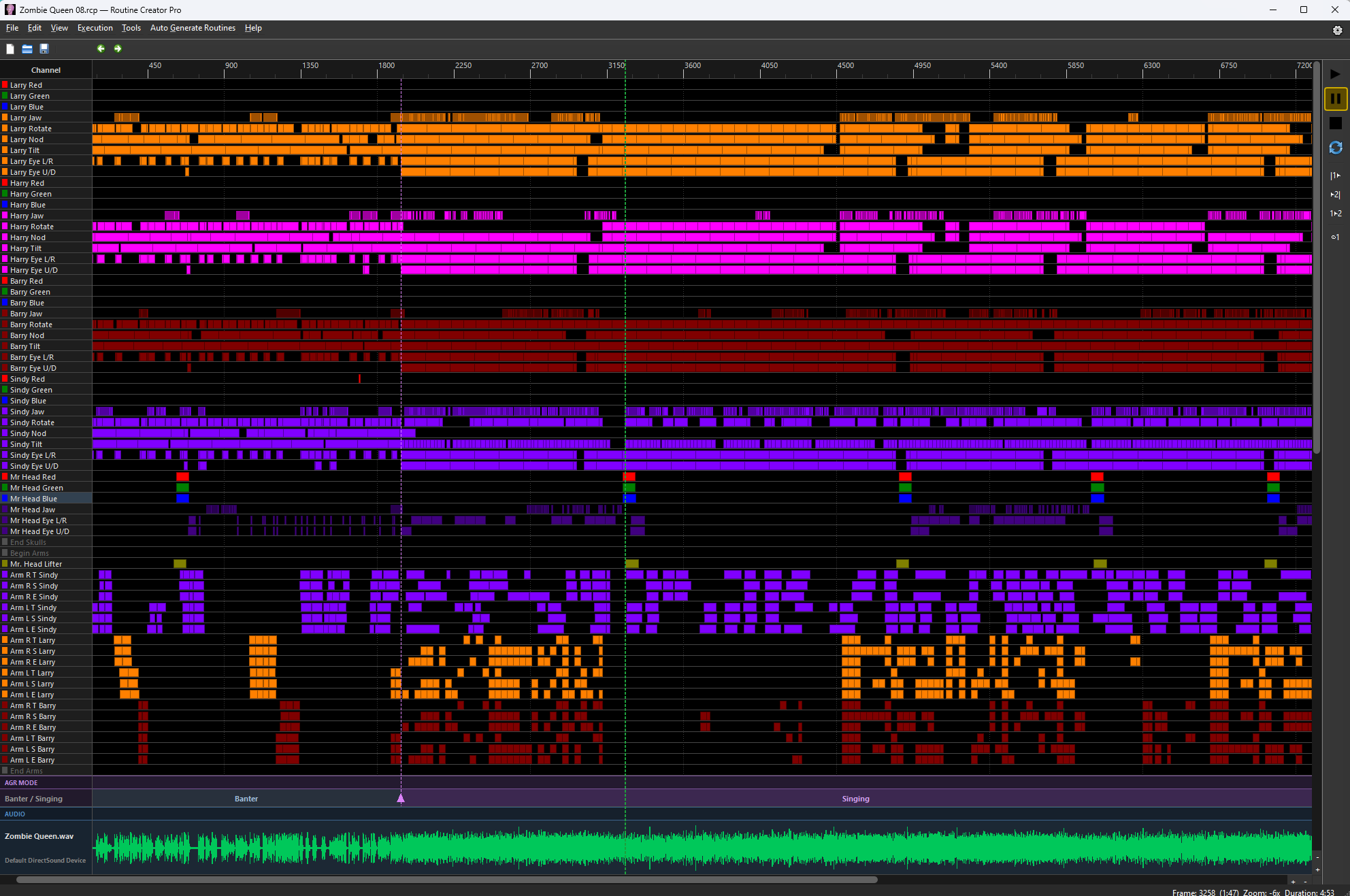
Routine Creator Pro timeline showing multiple programmed skull and arm movement tracks
Actual RCP timeline — an entire cast, coordinated in one routine.
In minutesGenerate a prepared show after one-time setup
Two waysAuto Generate Routines + Live Action
VSA in & outKeep your existing routine library
14 days freeExplore every feature with no restrictions
Two flagship capabilities

Let RCP choreograph your show.
Or perform it yourself.

These are two equally powerful ways to create animatronics performances. One automatically directs an entire cast; the other turns a live or recorded voice performance into a reusable single-skull routine.

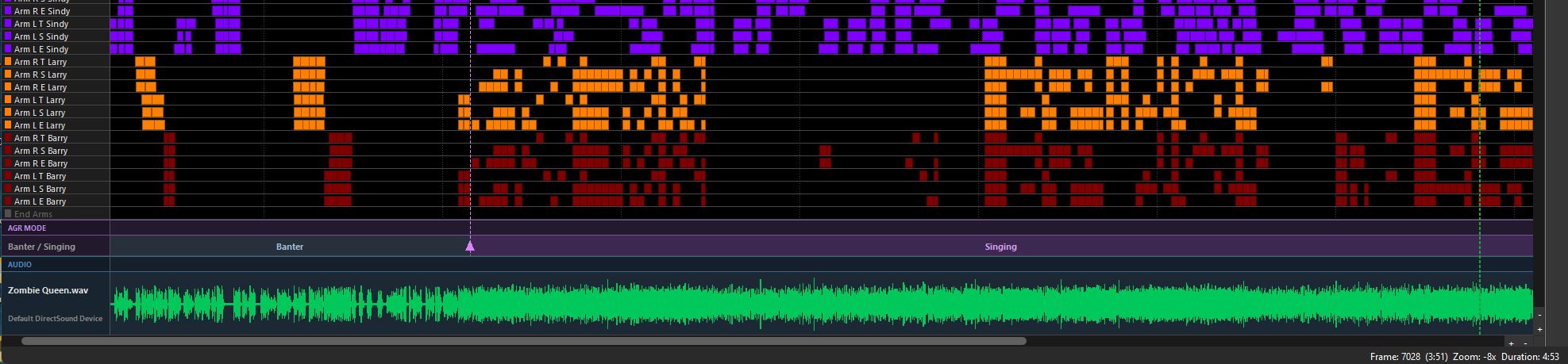
Routine Creator Pro generated event tracks for a song with Banter and Singing sections
FLAGSHIP FEATURE 01

Auto Generate Routines

Start with prepared audio and automatically generated jaw tracks. RCP discovers where the show is conversation and where it's singing, then creates the appropriate performance for each section.

  • Realistic head, eye, and arm movements for each character
  • Spatial awareness: listeners turn toward the speaker
  • Beat-aware lead and backup singer choreography
  • Configured lighting included in the performance
  • Regenerate a section or manually edit any event
  • End with lighting off and characters safely at Default

With a saved setup and prepared audio, a complete routine can be ready for your hardware in under five minutes. Audio separation and initial setup may take longer.

Explore automatic choreography →
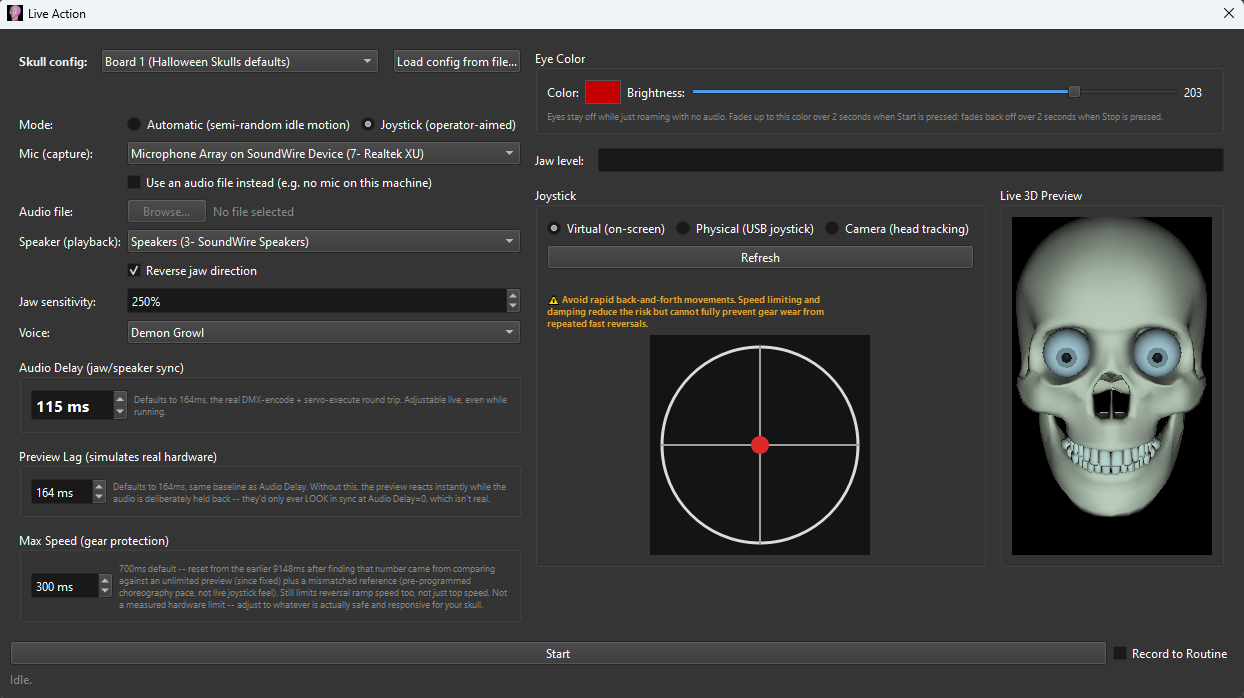
RCP Live Action control screen with microphone, joystick, audio and 3D preview controls
FLAGSHIP FEATURE 02

Live Action

Speak through your skull with the audience's audio timed to the jaw. Control its gaze, let it roam on its own, or feed it a prerecorded voice—and capture the whole performance as an editable routine.

  • Live microphone or prerecorded audio input
  • Adjustable audio-delay compensation for accurate sync
  • Automatic motion, mouse joystick, USB joystick, or webcam head tracking
  • Optional creature voice effects and LED eye control
  • Record jaw, head, eye, audio, and lighting events
  • No extra dedicated live voice-to-servo controller required

Compatible animatronic control equipment is still required to operate a physical skull.

Explore Live Action →
Auto Generate Routines

From your audio to a coordinated show

The repetitive technical work should not be the part that consumes your creative time. RCP follows the structure of your material and the physical layout of your cast.

  1. Set up your cast onceBuild a reusable template with skulls, arms, servo limits, lighting, and the Scene Map's physical positions.
  2. Bring in the voicesUse isolated vocal tracks, or try Jaw Stems to separate a mixed song. Generate synchronized jaw events for each voice.
  3. Discover the modesRCP identifies Banter and Singing passages automatically. Adjust the markers if a special passage needs your judgment.
  4. Generate the showProduce appropriate head, eye, arm, attention, musical choreography, and configured lighting events.
  5. Review or regeneratePreview it, edit anything, or regenerate just the part you'd like changed. Then play or export.

In conversation, the cast understands who's talking

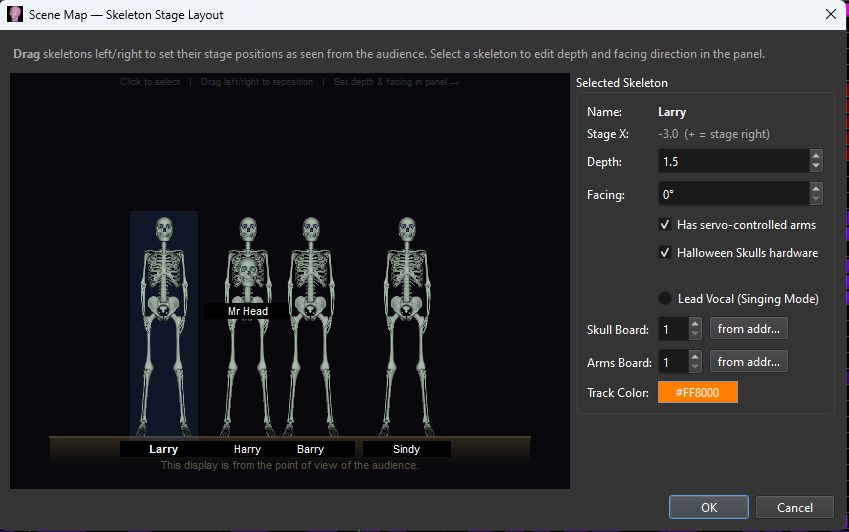
Using the Scene Map, a non-speaking skull can turn its eyes toward the speaker, then follow with its head. Between lines, independent idle movements, nods, and occasional side glances keep the characters from looking robotic. Arm gestures come from a library informed by real programmed performances.

The scene—not a series of random movements—drives the behavior.

Scene Map arranging animated characters in stage positions
Generated Banter and Singing sections displayed as RCP events

In a song, the cast becomes an ensemble

The lead performer can move independently while backup singers coordinate with one another and the beat. AGR uses recorded choreography, procedural patterns, group formations, repeatable chorus movements, and occasional audience-directed glances. It works with multi-skull casts and uses the movements each character's hardware actually supports.

RCP's underlying choreography builds on years of routines created by Halloween Skulls, rather than asking beginners to invent every gesture themselves.

Not happy with a section? Select it and regenerate fresh movements—without discarding the rest of the show. Every result remains fully editable.

Live Action

A living, speaking character—and a routine creator

Live Action isn't just a microphone-controlled jaw. It lets you perform a character, direct its movement, and preserve that performance as a routine you can refine and replay.

Precise lip-sync

RCP drives the jaw from the incoming voice and holds the audience audio long enough to compensate for the response time of the controller and servos. Adjust Audio Delay for your own hardware.

Four ways to move

Choose independent Automatic motion, an onscreen joystick, a physical USB joystick, or webcam head tracking for Rotate, Nod, and Tilt. Gaze can follow the operator's intent.

Record a full routine

Use your own live voice or a prerecorded file, perform the skull's movements, and choose Record to Routine. RCP stores audio and turns the performance into ordinary editable timeline events, including a generated jaw track.

What you perform can become what you replay

Recording captures smoothed head movements, eye direction, and eye-light fades. After the session, RCP uses the recorded audio with its Jaw Programmer to create the saved jaw track. You can then move, resize, copy, or refine any resulting event.

Perfect for an interactive haunt, a talking exhibit, or building a single-skull performance from scratch without hand-drawing every movement.

Recorded Live Action movements converted into editable events on the RCP timeline
The full toolset

Everything in the RCP toolbox

The two flagship modes are only the beginning. Here is a detailed feature inventory organized around the work you actually do. For exact controls, supported device settings, and step-by-step instructions, see the complete illustrated user guide.

Automatic routines & choreography

  • Discover Modes: analyze the audio to identify Banter and Singing sections; move or add section boundaries yourself.
  • Jaw Programmer: turn an isolated voice track into accurately timed jaw-servo events; run separately for different voices/skulls.
  • Scene Map: position and orient the cast; designate a lead singer; give movements spatial context.
  • Banter Mode: automatically choreograph speaker-focused attention, eye-first head turns, reactions, idle movement, and arm gestures.
  • Singing Mode: create beat-aware lead and backup performer choreography, with coordinated formations and repeat-chorus patterns.
  • Motion Library: incorporate recorded reference gestures and choreography, adapted to the configured servo ranges.
  • Automatic lighting: include configured lighting tracks in the performance and return them to their off state at the end.
  • Character resets: end the routine with the skulls and arms returning to their specified Default positions.
  • Regenerate Selection: rebuild just one passage, or focus on selected arm tracks; choose single-arm or double-arm alternatives.
  • Safety-aware movement: generated movement respects servo limits and the special movement constraints of the supported hardware.

Live Action & interactive control

  • Live microphone or audio file: speak on the spot or play a prerecorded voice through the same live-control pipeline.
  • Synchronized output: adjustable Audio Delay matches what the audience hears to physical jaw response; Preview Lag aligns onscreen monitoring.
  • Automatic motion: natural roaming head motion while the operator focuses on the voice.
  • Interactive aiming: virtual joystick, physical USB joystick, or webcam head tracking; joystick override of idle roaming.
  • Voice effects: optional Deep/Monster, Small Creature, Robot, and Demon Growl presets.
  • Eye color: RGB choice, brightness control, and automatic fade-in/fade-out.
  • Record to Routine: record speech, movements, eye aims, and eye-light events for later editing and replay.
  • Automatic recorded jaw: saved audio is processed into its own jaw track after a recorded session.
  • Session safeguards: startup countdown, hardware/address confirmation, movement-speed limits, and damping.
  • Built-in preview: see live movement on the 3D skull while rehearsing, even without physical hardware connected.

Audio & synchronized jaw tracks

  • Import multiple audio tracks without a fixed per-routine track limit in the mixer.
  • Per-track volume, left/right balance, timing offsets, mute, solo, lock, and output-device selection.
  • Jaw Stems: bundled AI-powered vocal separation can extract lead vocals, backup vocals, and instruments from a mixed recording.
  • Jaw Programmer controls: volume, compression, and smoothing to suit individual voice recordings and jaw mechanisms.
  • Add newly generated jaw events into empty sections without replacing existing work, or regenerate a jaw track when needed.
  • Bounce Mix: produce a single playback-ready WAV using current mixer levels, panning, and timing.
  • Use prepared studio vocal stems when you want more reliable separation than an automatic extraction can provide.

Timeline, editing & reusable motion

  • Full event timeline with audio waveform, shared playhead, markers, zoom, and plot view.
  • Drag, resize, and edit event positions, start/stop frames, and servo values, with live position preview.
  • Copy, paste, shift, mirror, repeat, and overwrite selected blocks of motion.
  • Copy to Character: transfer movements within or between routines, automatically scaling to another character's servo limits and optional mirror direction.
  • Adjust track motion amplitude without rewriting each event; apply servo offsets and reverse/match servo directions.
  • Undo/redo, selection-based editing, and optional Bézier easing (functional; still being refined).
  • Hide unused tracks, add spacer tracks, and organize substantial routines.
  • Work with multiple open routines and copy compatible motion between them.

VSA compatibility & exports

  • Open existing .vsa files directly without rebuilding routines or converting them first.
  • Save/export routines as .vsa when you want to continue using the VSA format.
  • Batch-convert an entire VSA folder into RCP routines, verifying files before placing originals in a separate folder.
  • Work with familiar VSA-style event tracks while gaining RCP's new automation tools.
  • Export to xLights .fseq for compatible DMX sequencing workflows.
  • Export selected tracks as per-frame CSV, including optional initial/default positions or sparse output.
  • Package Routine for Sharing: gather the routine, supporting sidecar information, and linked audio/video into one shareable folder.
  • Additional RCP-only information—such as Scene Maps—uses separate supporting files and may not transfer into the older VSA format.

Preview, video & show playback

  • 3D Preview: view characters and arms positioned on the Scene Map as you scrub or play, using the same routine movement data.
  • Visual-only preview calibration and jaw-direction adjustment to match different hardware.
  • Synced Video: run a full-show video synchronized with the animatronic routine, including a preview for single-monitor editing.
  • Video effects: trigger one-shot videos or jump scares from timeline tracks on a selected external display.
  • Playlist: save a running order with automatically advancing routines, optional filler audio, placeholder images, and planned pauses.
  • Play, pause, stop, loop, jump to the start, or begin at a first marker.
  • Built-in safety ramps help prevent sudden servo jumps while scrubbing or repositioning.
  • Keep compatibility with dedicated show-running workflows such as Helmsman.

Hardware setup, controllers & protection

  • Reusable character templates store track naming, DMX addresses, servo values, stage layout, and lighting assignments.
  • Setup Wizard includes Halloween Skulls defaults, Skulltronix defaults, and custom configuration.
  • Works with appropriately configured Halloween Skulls DMX servo controllers, generic DMX servos and dimmers, and relay outputs.
  • Support for several legacy serial controllers, including SSC-32, Mini SSC, Pololu, Maestro, and Parallax families; device-specific setup applies.
  • Additional legacy device types include SV203 servo, K108A relay, and SMI motor interfaces as documented in the guide.
  • Device controls for ports, track counts, servo ranges, defaults, reverse direction, and channel assignments.
  • Bandwidth Test checks serial communications capacity and DMX channel conflicts before a show.
  • Playback ramps, output limits, and movement damping help protect mechanisms from abrupt commands.
DMX animatronicsMultiple charactersMoving armsRGB eyesLighting & relaysSelected legacy serial boards
Compatibility and scope: Hardware must be configured correctly and connected through a compatible interface. Vocal separation results vary by recording; loosely timed music may need review. The current released platform is Windows; a macOS version is in development. Some controller options are device-specific, so consult the user guide for exact setup and limitations.
Why I built RCP

More than 20 years of "I wish the software could do that."

I've spent more than two decades building, programming, and performing with animatronic characters. I knew how much time it took to create a believable show—and how many features I wished existed to make it easier.

Instead of continuing to wait for those tools, I created Routine Creator Pro. I started with the professional editing capabilities animatronics programmers expected, then added the automation, live control, choreography, and creative flexibility I had wanted for my own shows.

The goal was simple: give experienced animatronic programmers their time back, and give beginners a practical way to create sophisticated performances.

— Bob Robertson, Halloween Skulls

Questions answered

What to know before you try it

Can a complete show really be generated in under five minutes?

With a one-time character and lighting template already built, prepared vocal audio, generated jaw tracks, and usable rhythm information, RCP can produce complete routines very quickly—in some cases under five minutes. Initial setup, audio-stem extraction, special musical material, and personal refinements can take additional time.

Do I have to know VSA or understand traditional servo programming?

No previous VSA experience is required. RCP's setup tools, automatic routines, and Live Action recording reduce the amount of manual programming involved. You'll still need to set up compatible hardware and learn the basic workflow, and the illustrated user guide walks you through it.

Can I bring in my existing VSA routines—and go back if I want?

Yes. RCP opens VSA routines directly, provides a batch conversion option for libraries, and can export to VSA format. Features that exist only in RCP may rely on supporting files that the original VSA format does not contain.

Can Live Action make a routine from a prerecorded voice?

Yes. You can use a recording instead of a live microphone, perform the skull's motions using automatic movement or one of the control methods, record the session, and save the resulting movements, audio, and generated jaw track into an editable routine.

Does Live Action require a separate voice-to-servo hardware device?

No extra dedicated voice-to-servo controller is required for Live Action. RCP provides the voice analysis and timing compensation in software. A physical animatronic still needs its normal compatible servo-control connection, and audio input/output equipment.

Can I still change movements after an automatic routine is generated?

Absolutely. AGR generates normal timeline events. Regenerate just the section you dislike, move or resize individual events, copy motions between characters, or edit the whole show manually whenever you want.

Does RCP work with only Halloween Skulls hardware?

No. It also includes generic DMX configuration, Skulltronix defaults, and support for selected older serial controllers. Available axes, eye-light behavior, and other functions depend on the hardware. Use the user guide's device list before purchasing or configuring a third-party system.

Does the free trial disable any features?

No. The trial is free for 14 days with no feature restrictions, so you can explore the program before purchasing. The currently available release is for Windows.

See what you can create

Try every RCP feature free for 14 days.

Build an automatic multi-character show. Speak through a skull in real time. Open an existing VSA routine. There are no trial feature restrictions—explore the tools yourself.

Questions about configuration or compatibility? Halloween Skulls offers direct, personal product support.